
AssistedField
AssistedField lends a control that keeps its value in state, not in a DOM field, as a field the assistant fills. It takes the value to show and the function that sets it.
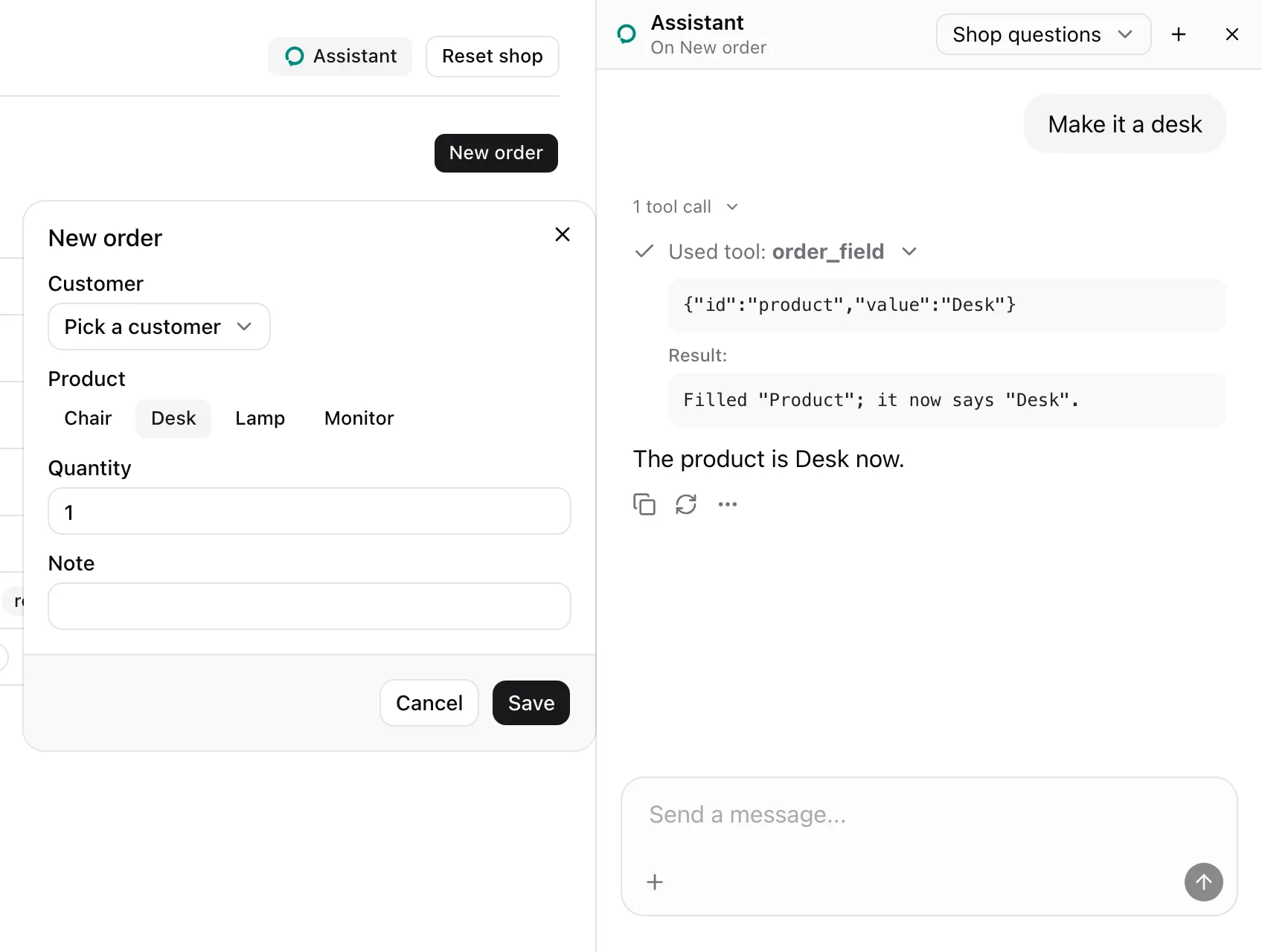
Pass the value and its setter, and wrap the control. From examples/app/app/orders/new-order.tsx:
<AssistedField name="order_field" id="product" label="Product" options={products.map((value) => ({ value }))} value={draft.product} onFill={(value) => set("product", value)}> <div role="group" aria-label="Product" className="flex gap-1"> {products.map((name) => ( <Button key={name} type="button" aria-pressed={draft.product === name} size="sm" variant={draft.product === name ? "secondary" : "ghost"} onClick={() => set("product", name)} > {name} </Button> ))} </div></AssistedField>The child is only the ring’s target. The value comes from value, and a fill goes through onFill.
What the model sees
Section titled “What the model sees”The picker shares the name order_field with the dialog’s AssistedInput fields, so it is one entry of that tool. With options, its entry lists the values it takes:
Fill one of these by its id. customer: Customer, one of "" (Pick a customer), "Acme", "Globex", "Initech", "Umbrella"; product: Product, one of "Chair", "Desk", "Lamp", "Monitor"; quantity: Quantity; note: Note.The dialog’s note shows what it says now, as for any field:
Its fields: order_field (customer: Customer, now ""; product: Product, now ""; quantity: Quantity, now "1"; note: Note, now "").The fill in the screenshot called onFill, waited for React to commit, and answered with value as rendered:
Filled "Product"; it now says "Desk".| Prop | Type | Required | Description |
|---|---|---|---|
name |
string |
Yes | The field’s tool name. Same-name fields on one page are one tool. |
label |
string |
Yes | What the field holds. Shown in the tool’s description and the page’s note. |
id |
string |
No | The field’s id within a same-name group. |
consequential |
boolean |
No | true rings the child for the user to fill. |
options |
AssistedFieldOption[] |
No | The only values the field takes. AssistedFieldOption is { value: string; label?: string }. |
value |
string |
Yes | What the field says now. The note shows it as a JSON string. |
onFill |
(value: string) => unknown |
Yes | Sets the field to the value the assistant chose. Awaited. |
children |
ReactElement |
Yes | One element whose ref reaches a DOM element, the ring’s target. |
- Throws
Render an assisted field inside an AssistedPageoutside a page. - A fill checks the child as
AssistedInputdoes, callsonFill, waits for pending React updates to commit, then answers withvalueas rendered. - The field is lent again only when
name,label,id,consequentialor the content ofoptionschanges.valueandonFillare read at call time. - A tool’s
valueparameter gains an enum only when every field of that name hasoptions. New order’sorder_fieldmixes the picker with two text inputs, so it has none.
See also
Section titled “See also”- Lend a form’s fields.
- Model context gives the field tool’s template.